
Purpose
This guide explains how to register a Market App, install it into an account, complete authentication, and start using API v3. It is intentionally not a full API reference — use the developer portal for exhaustive endpoint documentation.
|
These apps can:
|
APIv3 endpoints allows you to interact with:
|
Requirements
You need:
- A platform user with superadmin permissions to register the app.
- A backend server with a public HTTPS URL and the ability to handle HTTP requests.
- Basic knowledge of REST, HTTP headers, and JSON.
Quick start to authenticate
If you don't need to develop any UI that interacts with the platform, and just need a token to perform obtain data from the API, you can skip the App set-up and Handshake and authentication model sections, and just install the Access Token App.
This token has read-only permissions. If you needs further permissions - follow the app set-up and handshake instructions.
App set-up
Register your app (Organisation management → Market Apps)
- From the top-right user menu, open Organisation management.
- Go to Market Apps and click New Market App.
- Fill in:
- General info (name, description, icon, visibility private/public).
- URLs: Install URL (required), optional cleanup/uninstall URL; optional embedded UI views/reports/datasources.
- Permissions: grant the read/write resource areas your app will need (missing permissions can block access).
- Save the app and record App ID and App Secret (needed for token exchange on install).
Note: Private apps can be installed in your own organisation's accounts without any further action, while public apps (visible for platform customers) require approval. Contact support for approval, once the app is the app is ready and if you would like to make it public.
Install your app in an account (Apps Market)
- In the target account, open the Apps Market and install your app.
Handshake and authentication model
When a user installs your app:
- The platform calls your Install URL with dep_id and tem_token
- Your backend exchanges temp_token for a permanent token used in API v3 (x-dexcell-token).
- Your app returns HTTP 200 OK to complete installation.
Example: use the permanent token in API v3 calls
curl --request GET \
  --url "https://api.dexma.com/v3/locations" \
  --header "x-dexcell-token: <PERMANENT_TOKEN>"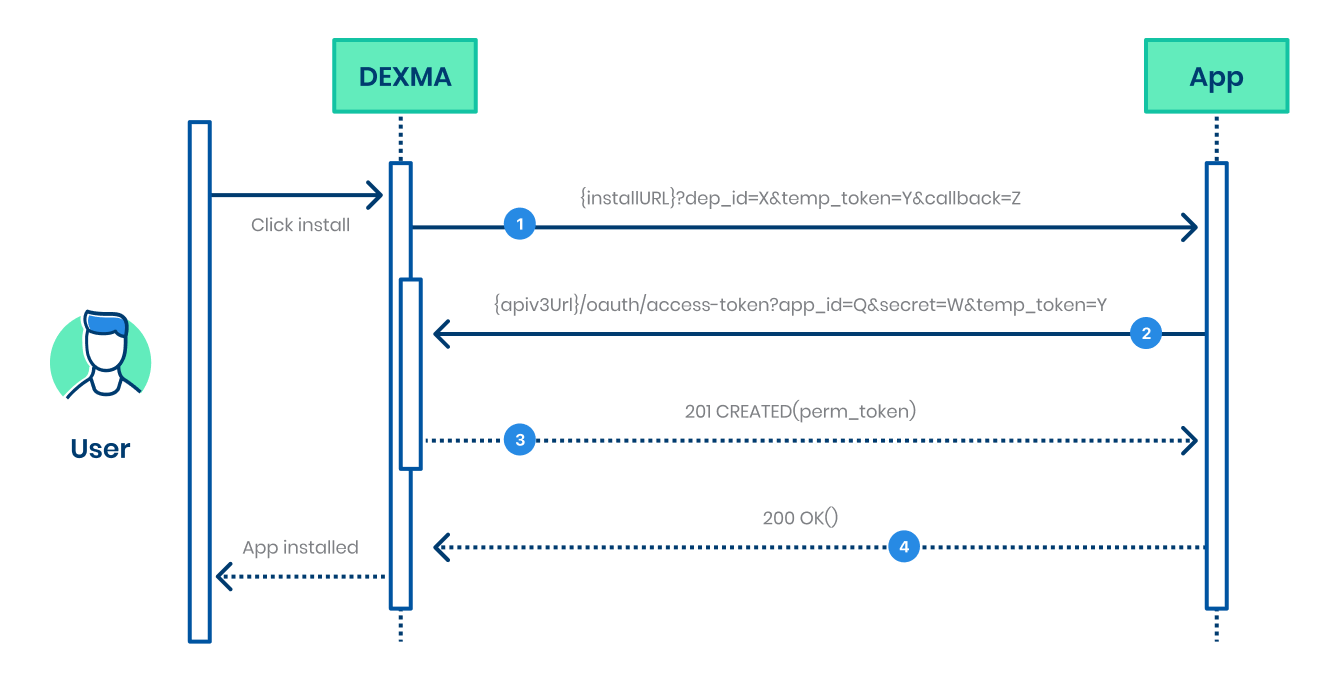
Rate limits
Defaults limits are of 10,000 requests/day and 1,000 requests/hour, which can be consulted in each petitions headers.
These limits can be increased upon request by sending an email to support. The email should include which are requested limits and a justification to why that capacity is necessary
Embedded UI (optional)
It possible to expose UI in different sections of the platform, including Dashboards, Analytics section, Reports and Datasource.
Platform session exposes information that you can use to built these interface, which include:
- account
- current_location
- location_tags
- locations_below
- user (including user role and locale)
- custom domain
Best practices (security + operability)
- Keep tokens server-side; do not expose x-dexcell-token in front-end code.
- Design for reinstall/uninstall: each installation yields a new token, and uninstall invalidates it.
- Cache and batch API v3 reads to avoid quota exhaustion.
Call examples
With the app registered and successfully installed in one of your accounts, you should have received the x-dexcell-token and stored it in your app. With that token, you can perform queries to the different endpoints of the API. All available queries are described in the platform's developer portal: developers.dexma.com.
Obtain a list of all my locations
- url: https://api.dexcell.com/v3/locations
- headers: x-dexcell-token
Obtain the specific information of one location
- url: https://api.dexcell.com/v3/locations/XXX
- headers: x-dexcell-token
Obtain readings
- url: http://api.dexcell.com/v3/readings?device_id=XXXXX&operation=DELTA¶meter_key=EACTIVE&resolution=D&from=2015-05-08T00:00:00&to=2015-05-09T23:59:59
- parameters:
- device_id: obtained from /devices. Not the same as the device key.
- parameter key: check parameters list and introduction to parameters
-
operation:
- for instant readings: RAW
- for time interval readings:
- DELTA for accumulated nature parameter (energy, volume, mass, ...)
- AVG, MAX, MIN for instantaneous nature parameters (power, temperature, humidity, ...)
-
resolution:
- if operation = RAW, then resolution must be = B
- if operation != RAW, then resolution can be any of: FM, TM, QH, HH, H, D, M
- from / to: YYYY-MM-DDThh:mm:ss (in local time)
- headers: x-dexcell-token